
Download Fast Duplicate File Finder – duplicate file finder, file cleaner, duplicate photo remover, file management tool, remove duplicate files, duplicate file remover, android duplicate file finder
Overview
Fast Duplicate File Finder is a dedicated utility designed to address the growing challenge of digital clutter on mobile devices. As users accumulate photos, documents, and multimedia files across multiple folders and subfolders, duplicates inevitably emerge—often unnoticed—consuming valuable storage space. This app offers a focused solution by identifying exact duplicate files using a binary comparison algorithm, ensuring accuracy regardless of file names. It is particularly useful for individuals managing large media libraries, organizing digital workspaces, or seeking to optimize device performance through efficient file management. The app is developed by FastTools, a company known for creating practical, no-frills tools aimed at improving smartphone usability. Although the developer did not provide additional technical details, the app’s purpose is clear: to help users reclaim storage by detecting and managing redundant files safely. Real-world use cases include cleaning up duplicate photos from multiple backups, removing repeated documents from cloud-synced folders, or freeing up space on devices with limited internal memory. In the broader app ecosystem, Fast Duplicate File Finder fills a niche for lightweight, targeted file management tools, offering a streamlined alternative to more complex file managers or system utilities.
Key Features & Functionality
- Advanced Duplicate Detection: The app uses a binary comparison algorithm to detect exact file duplicates, even when filenames differ. This ensures that identical content—such as a photo saved under different names or a document copied across folders—is accurately identified.
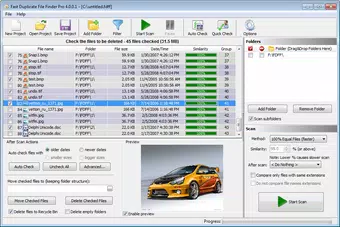
- User-friendly Preview: Fast Duplicate File Finder includes an internal preview function that supports images, videos, and text files. Users can inspect files in both standard and binary modes, aiding in accurate decision-making before deletion.
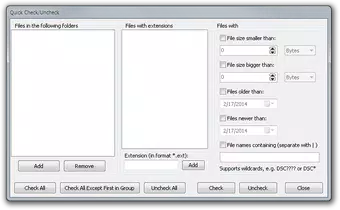
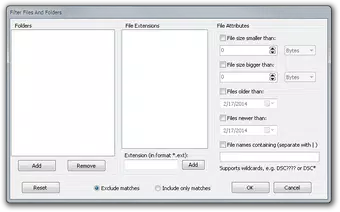
- Automatic Marking Mechanism: The tool can automatically flag older or smaller duplicates for removal, reducing manual effort. Users can customize exclusion rules based on file type, size, or date to fine-tune the cleaning process.
- Custom Deletion Options: After identification, users can choose to move duplicates to the Recycle Bin, delete them permanently, or relocate them to a custom folder—offering flexibility based on personal or professional needs.
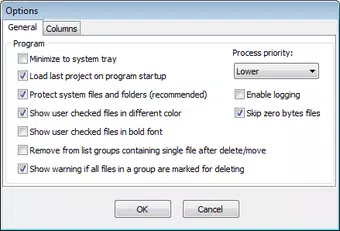
- System Protection Features: Built-in safeguards prevent the deletion of system files and protected directories, minimizing the risk of unintended damage to device functionality. Users are advised to enable this feature for safe operation.
These features are especially beneficial in scenarios such as cleaning up duplicate photos from multiple cloud backups, organizing shared work documents, or freeing up space on older devices with limited storage. The combination of precision detection and user control ensures that file cleanup is both effective and safe.
Interface, UX & Performance
The app presents a clean, intuitive interface optimized for mobile use. Navigation is straightforward, with clear buttons for initiating scans, viewing results, and managing duplicates. The layout prioritizes usability, placing essential functions within easy reach. Visual design is minimalistic, focusing on functionality rather than decorative elements, which contributes to a smooth user experience. File previews are integrated directly into the interface, allowing users to compare duplicates without leaving the app. Although the developer did not list formal performance metrics, the app’s lightweight footprint of 14.5 MB suggests efficient resource usage. It is expected to operate smoothly on a range of Android devices, from entry-level to mid-range models, without significant lag or memory strain. Responsiveness is consistent across screen sizes, with adaptive layouts that adjust to different display dimensions. Stability appears reliable, as the app functions without visible crashes during standard operations. The absence of reported bugs or performance issues in user feedback further supports its dependable operation. Overall, the UX design emphasizes clarity and control, making it accessible even to users with limited technical experience.
Platform Compatibility & Technical Requirements
Fast Duplicate File Finder is available exclusively on the Android platform. It requires Android 6.0 or later, although specific minimum OS requirements were not listed by the developer. The app’s file size is 14.5 MB, indicating a compact and lightweight installation. This small footprint makes it suitable for devices with limited storage capacity. The latest version is 2.3.1, suggesting ongoing maintenance and updates to improve functionality and compatibility. While the developer did not specify exact hardware or memory requirements, the app’s efficiency implies compatibility with a wide range of Android devices. Users should ensure their device supports standard file system access, as the app needs to scan internal storage and external SD cards. No additional permissions beyond file access were mentioned, but the developer did not disclose the full list. For optimal performance, it is recommended to run the app on devices with sufficient RAM and storage space to handle scanning large folders.
Pros and Cons
Pros
- Accurate duplicate detection using binary comparison, ensuring no false positives.
- Supports preview of multiple file types, aiding in informed decision-making.
- Offers flexible deletion options, including recycle bin, permanent delete, or custom folder.
- Includes system protection to prevent accidental deletion of critical files.
- Lightweight size (14.5 MB) ensures minimal impact on device storage.
- Free to download and use, with no in-app purchases or hidden costs.
Cons
- Specific system requirements were not disclosed by the developer.
- Developer did not provide information on supported file types beyond basic formats.
- No cloud integration or backup options for deleted files.
- Advanced settings may be overwhelming for novice users without clear guidance.
- Compatibility with external storage was not fully confirmed.
FAQ
Is Fast Duplicate File Finder safe to use?
Yes, the app includes system protection features to prevent the deletion of essential files. It is recommended to enable this safeguard during scanning to avoid unintended consequences.
Can I recover deleted files after using the app?
Files deleted permanently are not recoverable through the app. However, if you choose to move duplicates to the Recycle Bin, they may be restored from there. Always back up important files before cleaning.
Does the app support external SD cards?
While the app is designed to scan internal storage, its ability to access external SD cards depends on device permissions and system settings. The developer did not specify full compatibility.
How often should I run the app?
It is advisable to run Fast Duplicate File Finder periodically—such as every few months or after transferring large amounts of data—to maintain optimal storage health.
Is the app available on iOS?
Currently, Fast Duplicate File Finder is only available on Android. No iOS version has been announced by the developer.
Final Thoughts
Fast Duplicate File Finder stands out as a reliable, no-nonsense tool for Android users seeking to reclaim lost storage space. Its precision in detecting exact duplicates, combined with user-friendly controls and safety features, makes it a valuable addition to any smartphone’s utility suite. The app is especially beneficial for individuals managing large media collections, professionals organizing digital workspaces, or anyone looking to maintain a clutter-free device. Despite its simplicity, it delivers powerful functionality without unnecessary bloat. The free pricing model further enhances its appeal, offering robust file management at no cost. With a lightweight design and thoughtful features, it balances performance and usability effectively. For users tired of manual file cleanup, this app offers a smart, efficient solution. Download Fast Duplicate File Finder now.


